Command Pipeline
Author: Tavina Chen | Last Major Update: Tavina on 8/27/2026 | Contact: taffykat (Discord)
Patient Location
Section titled “Patient Location”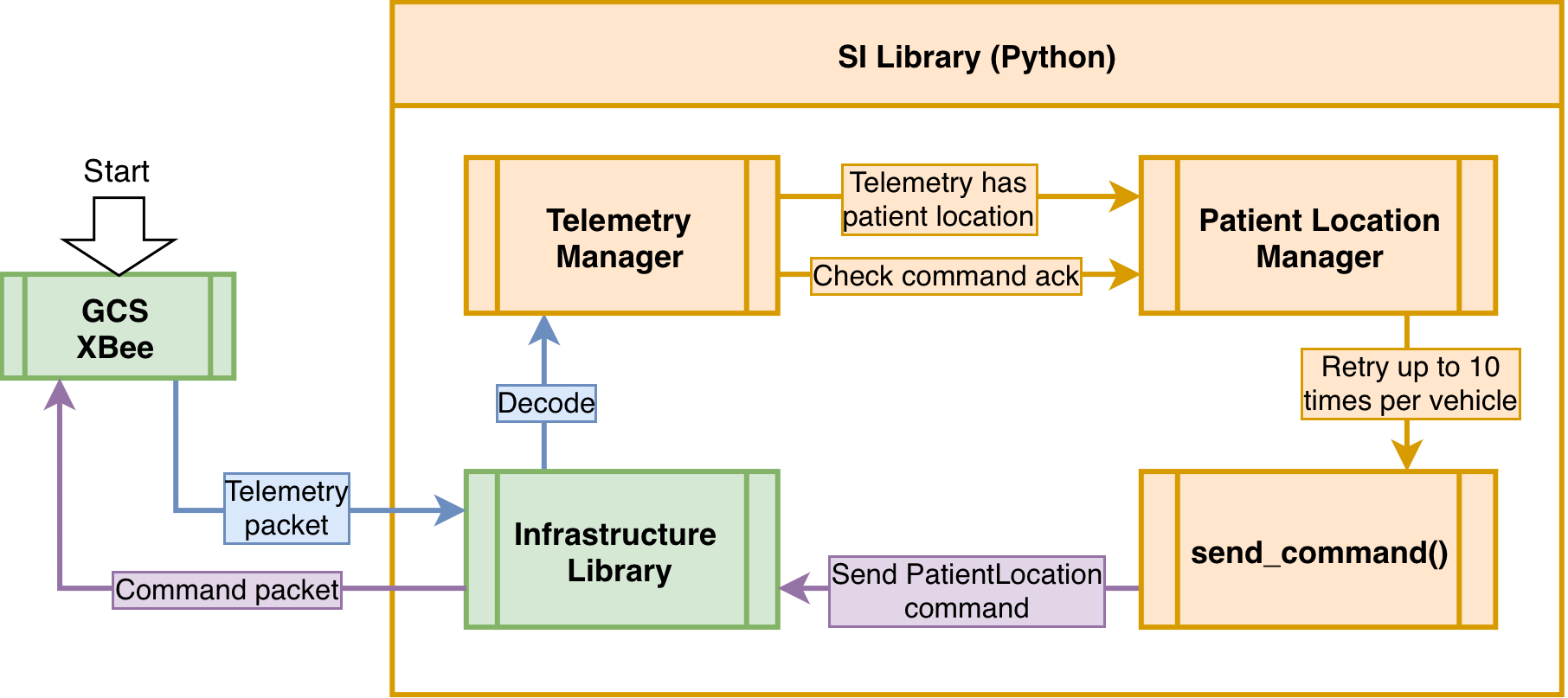
- Telemetry manager recieves Telemetry
- Telemetry manager checks Telemetry for message flag 2, indicating the patient has been found
- The Patient Location Manager uses the send_command() method to send the patient location to every vehicle
- Telemetry Manager checks the Telemetry of each vehicle for an acknowledgement of the PatientLocation command
- Once a vehicle has acknowledged the command, it is removed from the set.
- The Patient Location Manager will retry up to 10 times to send the PatientLocation command
- On the GCS Desktop, the telemetry is consumed and processed to display the statuses “Located” and “Secured”
Heartbeat (Partially working)
Section titled “Heartbeat (Partially working)”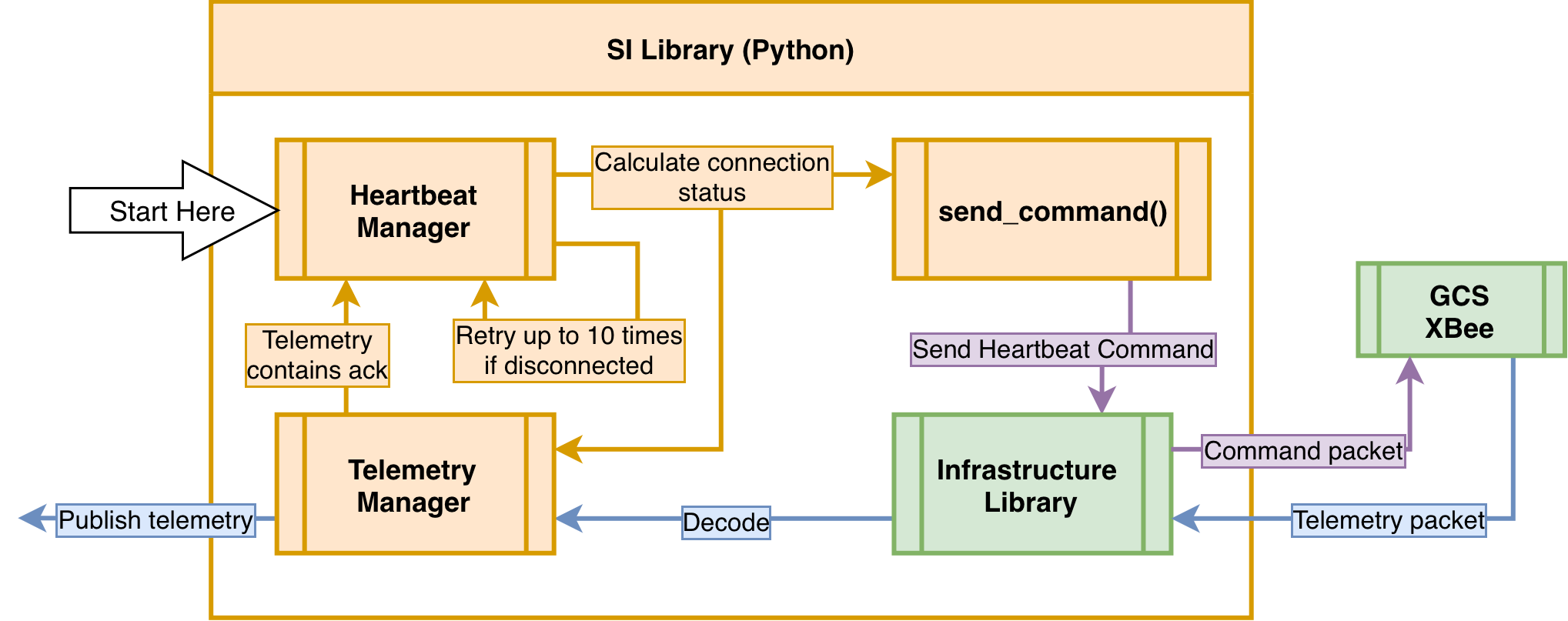
- Each vehicle has their own Heartbeat Manger
- It sends the Heartbeat command with the calculated status every second
- This status is updated in the telemetry before publishing it to the RabbitMQ telemetry queue
- The GCS App State Manager consumes the telemetry which is then emited to the UI and logged in the database
In the case of Disconnection
Section titled “In the case of Disconnection”- The Heartbeat Manager will send out 10 consecutive Disconnected Heartbeat statuses to the vehicle before shutting down. These are considered the reconnection attempts
- It will publish the last known telemetry packet data of that vehicle with the Disconnected status to the RabbitMQ telemetry queue
Why send Heartbeat(status)?
Section titled “Why send Heartbeat(status)?”Sending the Heartbeat is a way of “pinging” the vehicle to check if the connection is working.
Sending the status (bi-directionally) aims to solve cases where the vehicle thinks it is connected but isn’t and vice versa. It also allows the vehicles to differentiate between regular heartbeats and a reconnection attempt.
Otherwise, it is sending telemetry into the void without feedback.
Other Commands
Section titled “Other Commands”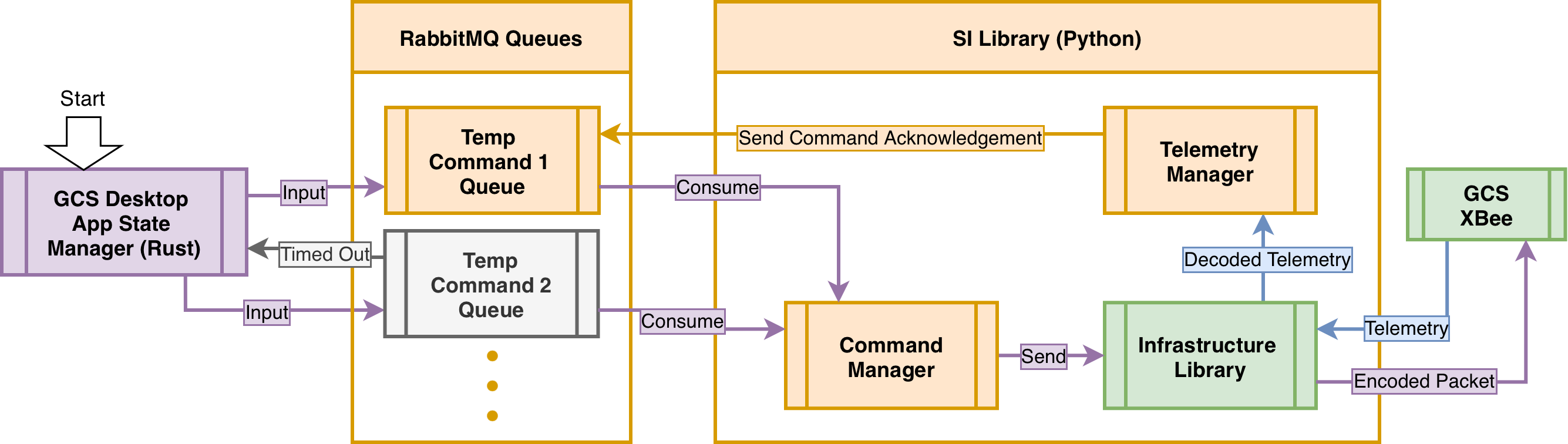
- The user presses a UI button (Emergency Stop, Start Mission) which updates the GCS App State Manager
- The State Manager publishes a command into a fixed RabbitMQ queue(Vehicle Command Queue).
- This queue will manage the timeout of the command
- The Command Manager consumes the command from the queue
- The command gets encoded and sent to the vehicle through the GCS Xbee
- Telemetry Manager checks the Telemetry for an acknowledgement of the command
- Once the command is acknowledged, a RabbitMQ ack is sent back to the fixed queue(Command Acknowledgement Queue).
- If the queue does not receive an acknowledgement during a time frame(expires), a toast notification will appear on the UI alerting the operator that the command failed to send
RabbitMQ
Section titled “ RabbitMQ ”GCS Desktop : Publisher Command
Section titled “ GCS Desktop : Publisher Command ”Connection Creation
Section titled “Connection Creation”impl CommandsApiImpl { async fn publish_command_to_rabbitmq(&self, command: &CommandsStruct) -> Result<(), String> { let addr = "amqp://admin:admin@localhost:5672/%2f"; let conn = Connection::connect(&addr, ConnectionProperties::default()) .await .map_err(|e| format!("Failed to connect to RabbitMQ: {}", e))?;Channel Creation
Section titled “Channel Creation” let channel = conn .create_channel() .await .map_err(|e| format!("Failed to create channel: {}", e))?;Queue Declaration
Section titled “Queue Declaration” let queue = channel .queue_declare( "vehicle_commands", QueueDeclareOptions { durable: true, ..Default::default() }, FieldTable::default(), ) .await .map_err(|e| format!("Failed to declare queue: {}", e))?;Serialize and publish
Section titled “Serialize and publish” let payload = serde_json::to_vec(command) .map_err(|e| format!("Failed to serialize command: {}", e))?;
let confirm = channel .basic_publish( "", "vehicle_commands", BasicPublishOptions { mandatory: true, ..Default::default() }, &payload, ) .await .map_err(|e| format!("Failed to publish: {}", e))?;}Software Integration : Consumer Command
Section titled “ Software Integration : Consumer Command ”Command Listener Initializer
Section titled “Command Listener Initializer”class CommandListener: def __init__(self,queue_name = 'vehicle_commands', on_command = None): self.queue = queue_name self.on_command = on_command credentials = pika.PlainCredentials("admin","admin") self.connection = pika.BlockingConnection(pika.ConnectionParameters(host='localhost', credentials= credentials, virtual_host= '/') ) self.channel = self.connection.channel() self.channel.queue_declare(queue = self.queue, durable = True) self.channel.queue_declare(queue = "command_ack", durable= True) self.pending_event = {}- Initializer, creates connection, channel, and declaration of
vehicle_commandandcommand_ackqueue
Start Consuming
Section titled “Start Consuming” def start(self) -> str: self.channel.basic_qos(prefetch_count=1) self.channel.basic_consume(queue=self.queue, on_message_callback= self._on_message) self.channel.start_consuming()- Creation of the consumer and start consuming the command queue
- The callback function is set to
_on_messagewhich will handle the incoming messages.
Callback Function
Section titled “Callback Function” def _on_message(self, ch, method,properties, body): msg = json.loads(body) if msg.get('vehicle_id') == 'ALL': vehicle_names = ['ERU','MRA','MEA'] for vehicle in vehicle_names: msg['vehicle_id'] = vehicle event_key = f"{vehicle}_{msg.get("command_id")}" event = threading.Event() self.pending_event[event_key] = event self.send_ack(msg,event,ch,method, properties, event_key) else: event_key = f"{msg.get('vehicle_id')}_{msg.get('command_id')}" event = threading.Event() self.pending_event[event_key] = event self.send_ack(msg,event,ch, method,properties, event_key)
ch.basic_ack(delivery_tag= method.delivery_tag)- The
_on_messagefunction is the callback function that is called when a message is received from the queue. - It checks if the
vehicle_idis “ALL”, if so, it sends the command to all vehicles, otherwise it sends the command to the specified vehicle. - It creates a threading event for each command and stores it in the
pending_eventdictionary with a key ofvehicle_id_command_id. - It then calls the
send_ackfunction to send the command and wait
Sending Acknowledgement
Section titled “Sending Acknowledgement” def send_ack(self, msg, event, ch, method, properties, event_key): success = False for _ in range(5): self.on_command(msg) success = event.wait(timeout = 5) if success: break self._on_publish(ch, method, properties,success, msg) self.pending_event.pop(event_key, None)- The
send_ackfunction sends the command to the vehicle and waits for an acknowledgement. - It will retry sending the command up to x times if it does not receive an acknowledgement within x seconds.
- It then calls the
_on_publishfunction to send the acknowledgement back to the queue and removes the event from thepending_eventdictionary.
Validation of Acknowledgement
Section titled “Validation of Acknowledgement” def resolve_ack(self, vehicle_id : str, command_id:int): event_key = f"{vehicle_id}_{command_id}" event = self.pending_event.get(event_key) if event: event.set() else: print(f"Key is not existent")- Set internal flag of the event to True otherwise the it has been a timeout for late replies.
- This will validate if the event has been acknowledged on time or not on the
event.wait()
- This will validate if the event has been acknowledged on time or not on the
Publishing back the message to the UI
Section titled “Publishing back the message to the UI” def _on_publish(self,ch, method,properties, success, msg): response_back = { "vehicle_id": msg.get("vehicle_id"), "command_id": msg.get("command_id"), "status": True if success else False } json_string = json.dumps(response_back) response_back = json_string.encode('utf-8') ch.basic_publish(exchange = '', routing_key = "command_ack", body = response_back )- Publishing back the message to the command ack queue for both True or False messages.