Contributing to Documentation
Format of Documentation
Section titled “Format of Documentation”The documentation is written in Markdown, where its syntax can be found here: Markdown Guide.
The documentation is structured in a way that each section is a separate Markdown file, which can be found in the src/content/docs directory.
The different sub-team documentations can be found in their respective directories.
Each file should have a blurb at the top, which is used to generate the sidebar and the page title.
How to Contribute
Section titled “How to Contribute”To contribute to the documentation, you can follow these steps:
- Clone the repository to your local machine.
- Navigate to the
src/content/docsdirectory. - Create a new branch for your changes.
- Create or edit the Markdown files as needed.
- Note, when creating a new file, make sure to include the blurb at the top of the file.
---title: [Title here without brackets]description: [Description here without brackets]---Contributing Diagrams
Section titled “Contributing Diagrams”We use draw.io to create our digrams.
Adding a new diagram
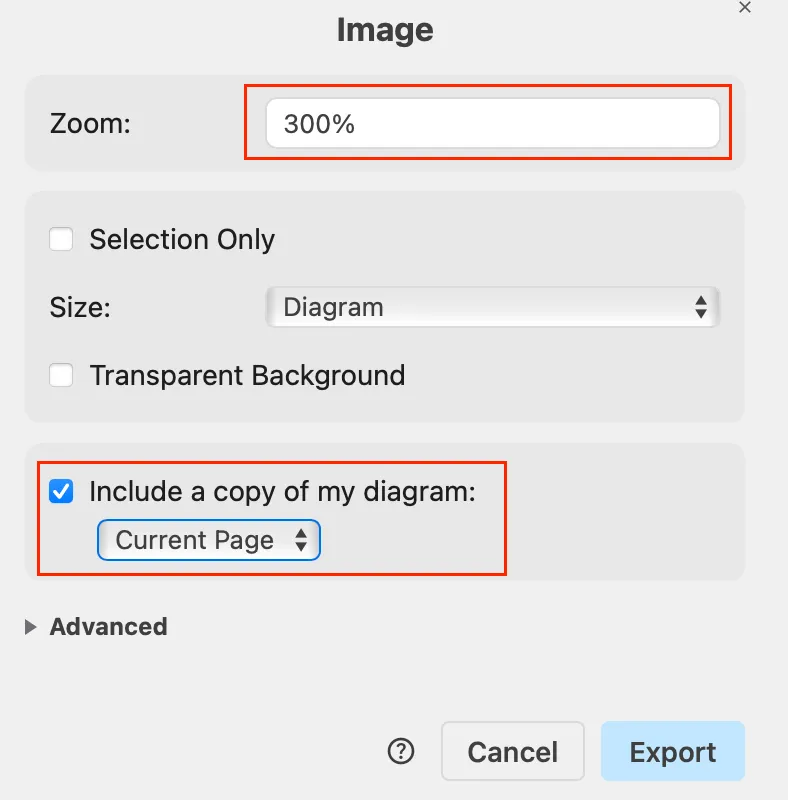
Section titled “Adding a new diagram”- Exporting the diagram from draw.io
- File -> Export as -> PNG
- Zoom 300% (so it is not blurry)
- Include copy of my diagram (ensures it is editable)
- Modify other settings as needed
- Add the exported diagram into the
public/diagramsdirectory. Use subdirectories as needed (the public directory ensures it is downloadable). - Insert it into the documentation with
in the md files.
Editing Existing Diagrams
Section titled “Editing Existing Diagrams”- Downloading the diagram
- Right click the target diagram
- Download the image
- Editing the Diagram in draw.io
- File -> Open from… -> Device -> select the downloaded diagram
- Modify the diagram and export as shown above in Adding a new diagram Step 1
- Replace the old file