Telemetry Pipeline
Author: Tavina Chen | Last Major Update: Tavina on 8/27/2026 | Contact: taffykat (Discord)
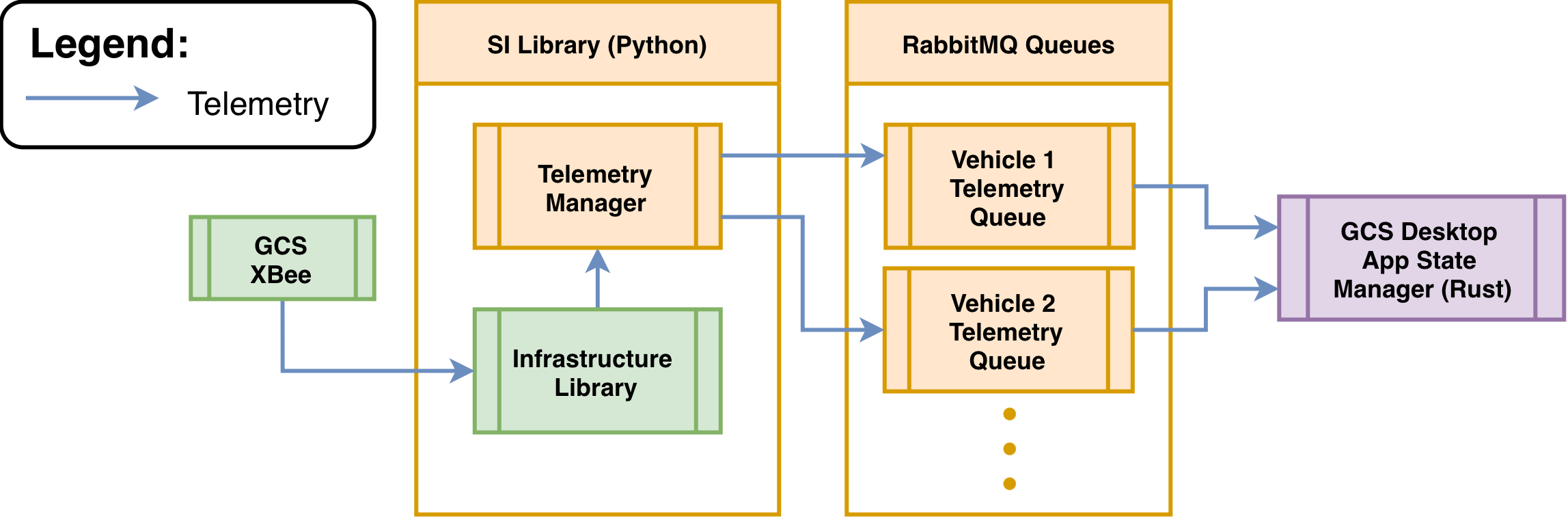
- Telemetry Manager recieves decoded Telemetry
- The Telemetry contains a Vehicle enum. The Telemetry manager uses this enum to identify and publish telemetry into the vehicle’s corresponding RabbitMQ queue
- The GCS App State Manager consumes the telemetry which is then emited to the UI and logged in the database
RabbitMQ
Section titled “ RabbitMQ ”SI Repository : Publisher Telemetry
Section titled “ SI Repository : Publisher Telemetry ”Set up server
Section titled “Set up server”def setup_rabbitmq(self): # Our RabbitMQ server requires a username/password credentials = pika.PlainCredentials("admin", "admin") # Inserting Parameters for the connection to the RabbitMQ server parameters = pika.ConnectionParameters( host=self.hostName, credentials=credentials, virtual_host="/", ) # Create a connection to the RabbitMQ server self.connection = pika.BlockingConnection(parameters) # Create a channel self.channel = self.connection.channel() # Create a telemetry queue for each vehicle self.channel.queue_declare( queue=f"telemetry_{self.vehicleName}", durable=True, )Vehicle data publishing
Section titled “Vehicle data publishing”def publish(self, data : Telemetry): # Serialize obj to a JSON formatted str to bytes message = self.to_actual_JSON(data).encode("utf-8") # Publish the telemetry message according to the routing key(vehicle queue name) self.channel.basic_publish( exchange= '', routing_key=f"telemetry_{self.vehicleName}", body = message )GCS Desktop Repository : Consumer Telemetry
Section titled “ GCS Desktop Repository : Consumer Telemetry ”Set up server
Section titled “Set up server”pub async fn new() -> LapinResult<Self> { let connection = Connection::connect(RABBITMQ_ADDR, ConnectionProperties::default().with_tokio()) .await?; let connection = Arc::new(Mutex::new(connection)); let channel = connection.lock().await.create_channel().await?;
let consumer = Self { connection, channel, state: Arc::new(Mutex::new(VehicleTelemetryData::default())), app_handle: None, };
Ok(consumer)}- Function to create an instance of the class/structure RabbitMQ
Initializer consumer for each vehicle
Section titled “Initializer consumer for each vehicle”pub async fn init_consumers(&self) -> LapinResult<()> { for vehicle_id in VALID_VEHICLE_IDS.iter() { let queue_name = format!("telemetry_{}", vehicle_id); // Declare queue first listen::queue_declare(&self.channel, &queue_name).await?; tokio::spawn({ let consumer = self.clone(); let queue = queue_name.clone(); async move { if let Err(e) = consumer.start_consuming(&queue).await { eprintln!("Failed to consume from queue {}: {}", queue, e); } } }); }
Ok(())}- Creates a queue and a RabbitMQ structure for each vehicle
Create consumer for each vehicle
Section titled “Create consumer for each vehicle”pub async fn create_consumer(channel: &Channel, queue_name: &str) -> LapinResult<Consumer> { channel .basic_consume( queue_name, &consumer_tag, BasicConsumeOptions::default(), FieldTable::default(), ) .await}- Creates consumer for each vehicle queue
Start consuming
Section titled “Start consuming”pub async fn start_consuming(&self, queue_name: &str) -> LapinResult<()> { let consumer = listen::create_consumer(&self.channel, queue_name).await?;
process::process_telemetry( consumer, self.state.clone(), self.db.clone(), self.app_handle.clone(), self.vehicle_heartbeats.clone(), self.heartbeat_timeout, ) .await?;
Ok(())}- Calls the creation of the consumer
- Sends the data to the process telemetry function
Process telemetry data
Section titled “Process telemetry data”pub async fn process_telemetry( mut consumer: Consumer, state: Arc<Mutex<VehicleTelemetryData>>,) -> LapinResult<()> { let mut failure_count = 0;
while let Some(delivery) = consumer.next().await { if let Ok(delivery) = delivery { match serde_json::from_slice::<TelemetryData>(&delivery.data) { Ok(mut data) => { let vehicle_id = data.vehicle_id.clone(); state .lock() .await .update_vehicle_telemetry_state(vehicle_id.clone(), data.clone());
if let Some(app_handle) = &app_handle { let vehicle_telemetry: VehicleTelemetryData = state.lock().await.clone(); match TelemetryEventTrigger::new(app_handle.clone()) .on_updated(vehicle_telemetry) } } } } }}- Receive telemetry data from the RabbitMQ queue for each vehicle
- Serialize according to the telemetry structure
- Update the state of the vehicle telemetry data
- Emit the telemetry state update using on_updated() as a TauRPC event to the frontend