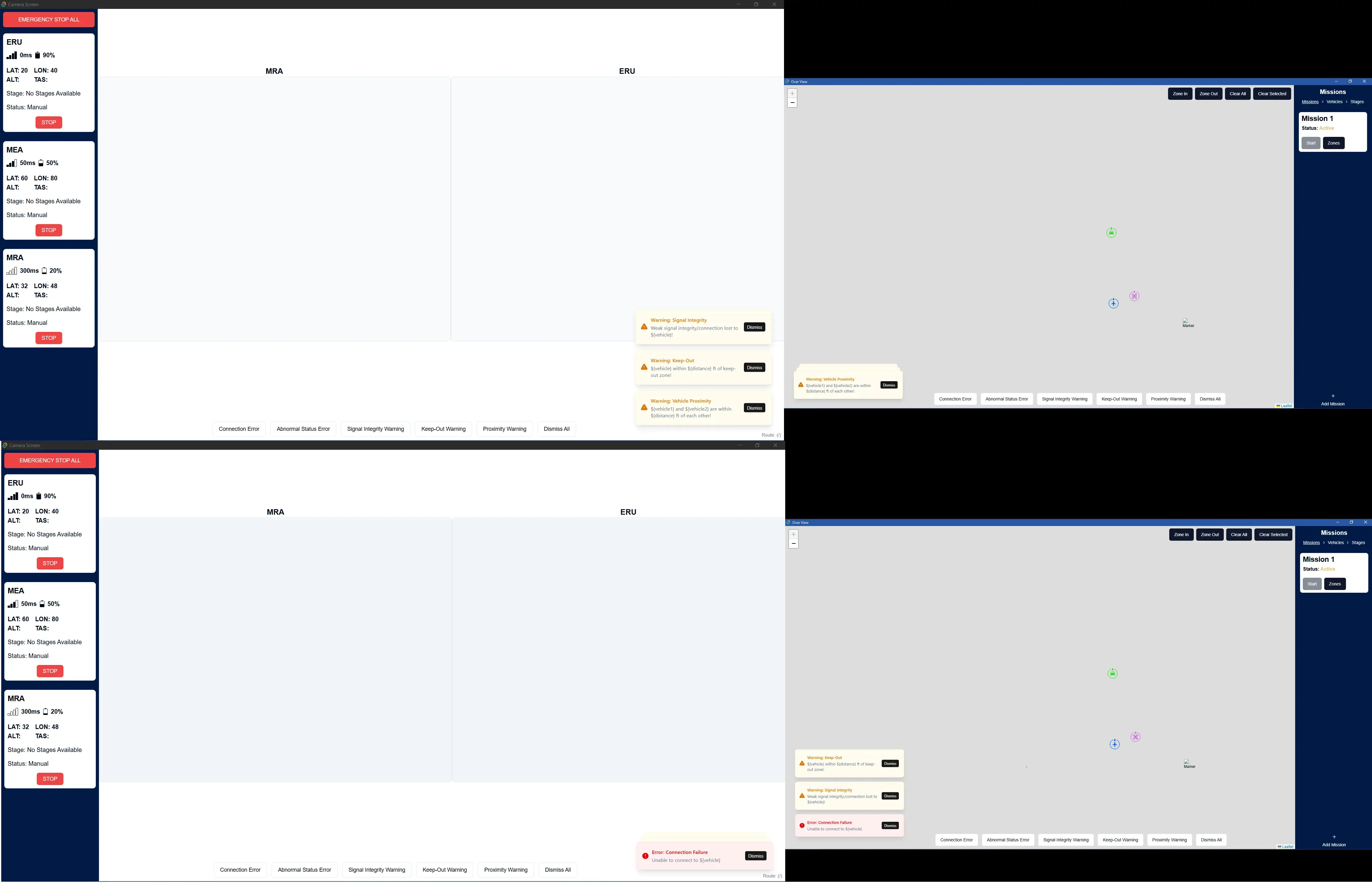
Alert Toast
The AlertToast.vue component displays errors and warnings generated by abnormal vehicle or mission statuses. It is a custom toast stack built with Vue and CSS — it does not depend on vue-sonner or any third-party toast library.
A separate AlertTestButtons.vue component provides placeholder buttons for generating and testing toasts during development.
Features
Section titled “Features”- Stacking: Toasts collapse into a compact stack and fan out on hover.
- Priority ordering: Error toasts always appear at the front of the stack; warnings sit behind them.
- Dismiss cooldown: Error toast dismiss buttons are disabled for 3 seconds after appearing, with a visible countdown.
- Synchronization: Toasts sync between screens via Tauri events.
- Positioning: Toasts position themselves based on the current screen.
- No expiration or limit: Toasts persist until explicitly dismissed or the underlying condition clears.
- Backend integration: Alert conditions are evaluated from live telemetry data.
Component Architecture
Section titled “Component Architecture”The alert system is split into two components:
AlertToast.vue— Listens for Tauri events, manages toast state, renders the toast stack. Contains no test UI.AlertTestButtons.vue— A development-only component with buttons that emit toast events for testing. These buttons can be toggled via a developer flag titled VITE_ERROR_TOAST_DEBUG in .env
<template> <AlertToast /> <AlertTestButtons /> <!-- Remove before production --> <div class="flex h-[100dvh] flex-col"> <SidebarProvider class="min-h-0 flex-grow overflow-y-hidden"> <RouterView /> </SidebarProvider> </div></template>Toast Stack Behavior
Section titled “Toast Stack Behavior”Collapsed State
Section titled “Collapsed State”When not hovered, toasts collapse into a compact stack anchored to the bottom of the viewport. The front toast (always the highest-priority error) is fully visible. Up to VISIBLE_COLLAPSED (default: 3) toasts peek behind the front toast with slight vertical offsets and scale reduction. Toasts beyond this limit are fully hidden.
Expanded State
Section titled “Expanded State”On hover, the stack fans out upward. All toasts become fully visible with equal spacing. Each non-front toast is translated upward using a calculated pixel offset based on TOAST_HEIGHT_ESTIMATE (72px) and TOAST_GAP (8px).
Priority Ordering
Section titled “Priority Ordering”The sortedToasts computed property sorts warnings before errors in the array. Combined with the getStackIndex function, this places errors at stack-index 0 (the front) and warnings further back. Errors are always the most prominent and visible toasts.
// Warnings sort first (back of stack), errors sort last (front of stack)const sortedToasts = computed(() => { return Object.values(activeToasts.value).sort((a, b) => { const priority = (type: string): number => (type === "error" ? 1 : 0); return priority(a.type) - priority(b.type); });});Dismiss Cooldown
Section titled “Dismiss Cooldown”Error toasts have a 3-second cooldown before they can be dismissed. The dismiss button displays a countdown — Dismiss (3) → Dismiss (2) → Dismiss (1) → Dismiss — and is greyed out and disabled until the countdown completes. Warning and info toasts can be dismissed immediately.
The cooldown uses per-toast setTimeout chains rather than a global polling interval. This avoids triggering component-wide re-renders that would cause TransitionGroup to replay enter animations.
const startCooldown = (id: string): void => {  disabledToasts[id] = 3;
  const tick = (remaining: number) => {    if (remaining <= 0) {      delete disabledToasts[id];      return;    }    disabledToasts[id] = remaining;    setTimeout(() => tick(remaining - 1), 1000);  };
  setTimeout(() => tick(2), 1000);};
Toast Synchronization
Section titled “Toast Synchronization”Because the application has two windows/screens, the toast system uses Tauri event listeners and emitters to synchronize alerts across all windows. If one screen is refreshed, toasts on that screen will be out of sync until new telemetry triggers them again.
Event System
Section titled “Event System”The component listens for three events:
listen("create-toast", (event) => {  const payload = event.payload as ToastData;  addOrUpdateToast(payload);});
listen("dismiss-toast", (event) => {  const { id } = event.payload as { id: string };  removeToast(id);});
listen("dismiss-all-toasts", () => {  clearAll();});
The test buttons component emits these same events. Here is one button as an example:
<Button variant="outline" @click=" emit('create-toast', { id: 'test_connection_error', type: 'error', title: 'Error: Connection Failure', description: 'Unable to connect to ERU (test)', }) "> Connection Error</Button>Toast Positioning
Section titled “Toast Positioning”Toasts are positioned to avoid covering sidebars that contain critical information. On the Camera Screen (/), toasts appear at the bottom-right. On the Overview Screen, they appear at the bottom-left.
const route = useRoute();const isRight = computed(() => route.path === "/");The computed value drives a class binding on the stack container:
:class="[ 'toast-stack', isRight ? 'toast-stack--right' : 'toast-stack--left', { 'toast-stack--expanded': isHovered },]"To verify routes during development, add this to any view:
<div class="text-xs text-gray-500 fixed bottom-2 right-2 z-50"> Route: {{ route.name }} ({{ route.path }})</div>Toast Styling
Section titled “Toast Styling”Toasts are color-coded by type:
- Error: Red
- Warning: Yellow
- Info: Blue
Each toast includes an SVG icon matching its type (circle-x for errors, triangle-alert for warnings, circle-info for info).
CSS Architecture Notes
Section titled “CSS Architecture Notes”The stack avoids position switching between absolute and relative on hover, as that causes layout reflows that TransitionGroup misinterprets as movement, re-triggering enter animations. Instead, non-front toasts are position: absolute at all times, and the expand/collapse effect is achieved purely through transform: translateY() changes, which are GPU-composited and reflow-free.
The front toast (stack-index 0) remains position: relative so the stage container has an intrinsic height.
Errors and Warnings
Section titled “Errors and Warnings”Here is the list of errors and warnings that can be generated:
- Error: Connection Failure — Unable to connect to [vehicle]
- Error: Abnormal Status — Abnormal [vehicle] status (low battery, system error/failure)!
- Warning: Signal Integrity — Weak signal integrity/connection lost to [vehicle]!
- Warning: Keep-Out — [Vehicle] within [distance] ft of keep-out zone!
- Warning: Vehicle Proximity — [Vehicle 1] and [Vehicle 2] are within [distance] ft of each other!
Backend Integration
Section titled “Backend Integration”The alert system is integrated with the backend through a reactive monitoring architecture. Telemetry data received from RabbitMQ is processed by the Rust backend, flows through TauRPC to update the TelemetryStore (Pinia), and is evaluated for alert conditions by the alertMonitoring module.
Alert Detection Flow
Section titled “Alert Detection Flow”- Telemetry Update: Backend receives new telemetry data from RabbitMQ
- Store Update: TauRPC emits
on_updatedevent → TelemetryStore syncs - Subscription Trigger: StoresSync detects telemetry state change
- Condition Check:
alertMonitoring.checkAlerts()evaluates all conditions - Alert Emission: If condition met → emit
create-toastevent - Toast Display: AlertToast.vue receives event → displays toast
Alert Monitoring Module
Section titled “Alert Monitoring Module”The src/lib/alertMonitoring.ts module contains all alert detection logic.
Configurable Thresholds
Section titled “Configurable Thresholds”export const ALERT_THRESHOLDS = { SIGNAL_STRENGTH: -70, // dBm LOW_BATTERY: 20, // percent PROXIMITY: 100, // feet};Adjust these values to change alert sensitivity.
Debouncing Configuration
Section titled “Debouncing Configuration”const ALERT_UPDATE_DEBOUNCE = 3000; // 3 secondsThis prevents excessive toast updates for the same alert. If a condition persists, the alert will update every 3 seconds with the latest data. Increase or decrease this value to adjust update frequency.
Example: Signal Strength Alert
Section titled “Example: Signal Strength Alert”const checkSignalStrength = (vehicle: string, signalStrength: number): void => { if (signalStrength < ALERT_THRESHOLDS.SIGNAL_STRENGTH) { emitAlert( vehicle, "signal_strength", "warning", "Warning: Signal Integrity", `Weak signal integrity/connection lost to ${vehicle}!` ); } else { clearAlert(vehicle, "signal_strength"); }};Integration with StoresSync
Section titled “Integration with StoresSync”In src/lib/StoresSync.ts, the telemetry store is monitored for changes:
import { checkAlerts } from "./alertMonitoring";
export const establishTaurpcConnection = () => {  // ... existing setup ...
  telemetryStore = telemetryPiniaStore();
  // Subscribe to telemetry changes and check for alerts  telemetryStore.$subscribe((mutation, state) => {    checkAlerts(state.telemetryState);  });};
Alert Deduplication and Updates
Section titled “Alert Deduplication and Updates”Key-Based System
Section titled “Key-Based System”Each alert has a unique key generated from the vehicle and alert type:
const getAlertKey = (vehicle: string, type: string): string => { return `${vehicle}_${type}`; // e.g., "ERU_signal_strength"};This key serves as both the deduplication key and the toast ID. When create-toast is emitted with an ID that already exists in activeToasts, the existing toast is updated in place rather than creating a duplicate.
Important Behavior
Section titled “Important Behavior”If a user manually dismisses a toast, but the underlying condition still exists, the toast will reappear on the next telemetry update (after the debounce period). This is intentional — alerts represent real conditions that need attention. To permanently dismiss an alert, resolve the underlying condition (e.g., improve signal strength, recharge battery).
Gallery
Section titled “Gallery”